Example FlowSOM Pipeline#
This vignette describes a protocol for analyzing high-dimensional cytometry data using FlowSOM, a clustering and visualization algorithm based on a self-organizing map (SOM). FlowSOM is used to distinguish cell populations from cytometry data in an unsupervised way and can help to gain deeper insights in fields such as immunology and oncology.
Loading in the data#
FlowSOM handles different inputs, such as an anndata object by pytometry or a filepath. For this purpose we will make use of an anndata object. This allows
easier preprocessing. Note that this requires also installing the pytometry package (version > 0.1.5) with e.g. pip install pytometry.
# Import modules
import flowsom as fs
import pytometry as pm
import scanpy as sc
import csv
import numpy as np
import matplotlib.pyplot as plt

# set default plotting parameters
plt.rcParams["figure.figsize"] = (6.5, 4.8)
plt.rcParams["figure.dpi"] = 300
plt.rcParams["font.size"] = 10
# Load data
ff = fs.io.read_FCS("../../tests/data/not_preprocessed.fcs")
ff
AnnData object with n_obs × n_vars = 19225 × 18
    var: 'n', 'channel', 'marker', '$PnB', '$PnE', '$PnG', '$PnR', '$PnV'
    uns: 'meta'
We can get an overview of the most important data in our anndata object by using var. All the metadata is stored in a dictionary at ff.uns["meta]
ff.var
| n | channel | marker | $PnB | $PnE | $PnG | $PnR | $PnV | |
|---|---|---|---|---|---|---|---|---|
| Time | 1 | Time | 32 | 0,0 | 0.01 | 262144 | ||
| FSC-A | 2 | FSC-A | 32 | 0,0 | 1.0 | 262144 | 280 | |
| FSC-H | 3 | FSC-H | 32 | 0,0 | 1.0 | 262144 | 280 | |
| FSC-W | 4 | FSC-W | 32 | 0,0 | 1.0 | 262144 | 280 | |
| SSC-A | 5 | SSC-A | 32 | 0,0 | 1.0 | 262144 | 280 | |
| SSC-H | 6 | SSC-H | 32 | 0,0 | 1.0 | 262144 | 280 | |
| SSC-W | 7 | SSC-W | 32 | 0,0 | 1.0 | 262144 | 280 | |
| GFP | 8 | FITC-A | GFP | 32 | 0,0 | 1.0 | 262144 | 412 |
| CD8 | 9 | Pacific Blue-A | CD8 | 32 | 0,0 | 1.0 | 262144 | 417 |
| l/d | 10 | AmCyan-A | l/d | 32 | 0,0 | 1.0 | 262144 | 496 |
| Qdot 605-A | 11 | Qdot 605-A | 32 | 0,0 | 1.0 | 262144 | 588 | |
| TCRyd | 12 | APC-A | TCRyd | 32 | 0,0 | 1.0 | 262144 | 597 |
| CD45 | 13 | Alexa Fluor 700-A | CD45 | 32 | 0,0 | 1.0 | 262144 | 492 |
| TCRb | 14 | APC-Cy7-A | TCRb | 32 | 0,0 | 1.0 | 262144 | 511 |
| NK1/1 | 15 | PE-A | NK1/1 | 32 | 0,0 | 1.0 | 262144 | 505 |
| CD4 | 16 | PE-Texas Red-A | CD4 | 32 | 0,0 | 1.0 | 262144 | 560 |
| CD19 | 17 | PE-Cy5-A | CD19 | 32 | 0,0 | 1.0 | 262144 | 593 |
| CD3 | 18 | PE-Cy7-A | CD3 | 32 | 0,0 | 1.0 | 262144 | 588 |
ff.uns["meta"].keys()
dict_keys(['__header__', '$BEGINANALYSIS', '$BEGINDATA', '$BEGINSTEXT', '$BTIM', '$BYTEORD', '$DATATYPE', '$DATE', '$ENDANALYSIS', '$ENDDATA', '$ENDSTEXT', '$ETIM', '$FIL', '$INST', '$MODE', '$NEXTDATA', '$PAR', '$SRC', '$SYS', '$TIMESTEP', '$TOT', 'APPLY COMPENSATION', 'AUTOBS', 'CREATOR', 'EXPERIMENT NAME', 'EXPORT TIME', 'EXPORT USER NAME', 'FCSversion', 'FILENAME', 'flowCore_$P10Rmax', 'flowCore_$P10Rmin', 'flowCore_$P11Rmax', 'flowCore_$P11Rmin', 'flowCore_$P12Rmax', 'flowCore_$P12Rmin', 'flowCore_$P13Rmax', 'flowCore_$P13Rmin', 'flowCore_$P14Rmax', 'flowCore_$P14Rmin', 'flowCore_$P15Rmax', 'flowCore_$P15Rmin', 'flowCore_$P16Rmax', 'flowCore_$P16Rmin', 'flowCore_$P17Rmax', 'flowCore_$P17Rmin', 'flowCore_$P18Rmax', 'flowCore_$P18Rmin', 'flowCore_$P1Rmax', 'flowCore_$P1Rmin', 'flowCore_$P2Rmax', 'flowCore_$P2Rmin', 'flowCore_$P3Rmax', 'flowCore_$P3Rmin', 'flowCore_$P4Rmax', 'flowCore_$P4Rmin', 'flowCore_$P5Rmax', 'flowCore_$P5Rmin', 'flowCore_$P6Rmax', 'flowCore_$P6Rmin', 'flowCore_$P7Rmax', 'flowCore_$P7Rmin', 'flowCore_$P8Rmax', 'flowCore_$P8Rmin', 'flowCore_$P9Rmax', 'flowCore_$P9Rmin', 'FSC ASF', 'GUID', 'ORIGINALGUID', 'P10BS', 'P10DISPLAY', 'P10MS', 'P11BS', 'P11DISPLAY', 'P11MS', 'P12BS', 'P12DISPLAY', 'P12MS', 'P13BS', 'P13DISPLAY', 'P13MS', 'P14BS', 'P14DISPLAY', 'P14MS', 'P15BS', 'P15DISPLAY', 'P15MS', 'P16BS', 'P16DISPLAY', 'P16MS', 'P17BS', 'P17DISPLAY', 'P17MS', 'P18BS', 'P18DISPLAY', 'P18MS', 'P1BS', 'P1MS', 'P2BS', 'P2DISPLAY', 'P2MS', 'P3BS', 'P3DISPLAY', 'P3MS', 'P4BS', 'P4MS', 'P5BS', 'P5DISPLAY', 'P5MS', 'P6BS', 'P6DISPLAY', 'P6MS', 'P7BS', 'P7MS', 'P8BS', 'P8DISPLAY', 'P8MS', 'P9BS', 'P9DISPLAY', 'P9MS', 'THRESHOLD', 'transformation', 'TUBE NAME', 'WINDOW EXTENSION', 'channels', 'header', 'spill'])
Additionaly we can read in a csv file as well.
ff_csv = fs.io.read_csv("../../tests/data/fcs.csv")
ff_csv
AnnData object with n_obs × n_vars = 19225 × 18
    var: 'n', 'channel', 'marker'
The FlowSOM function accepts an anndata object or a filepath to a fcs or csv file. The FlowSOM function will return a FlowSOM mudata object. This object contains all the information about the SOM and the clustering.
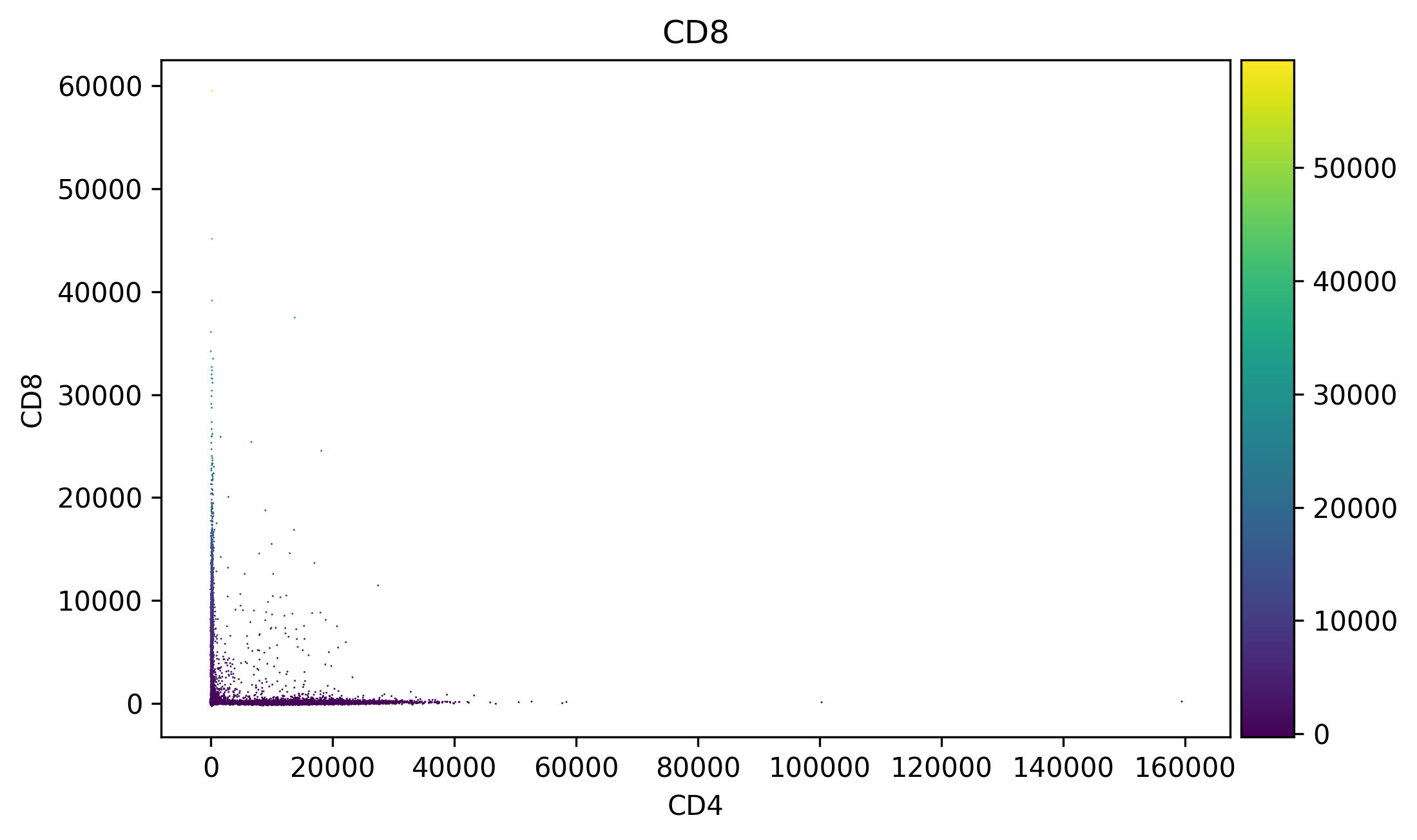
# Visualize data
sc.pl.scatter(ff, x="CD4", y="CD8", color="CD8", size=2)
Preprocessing#
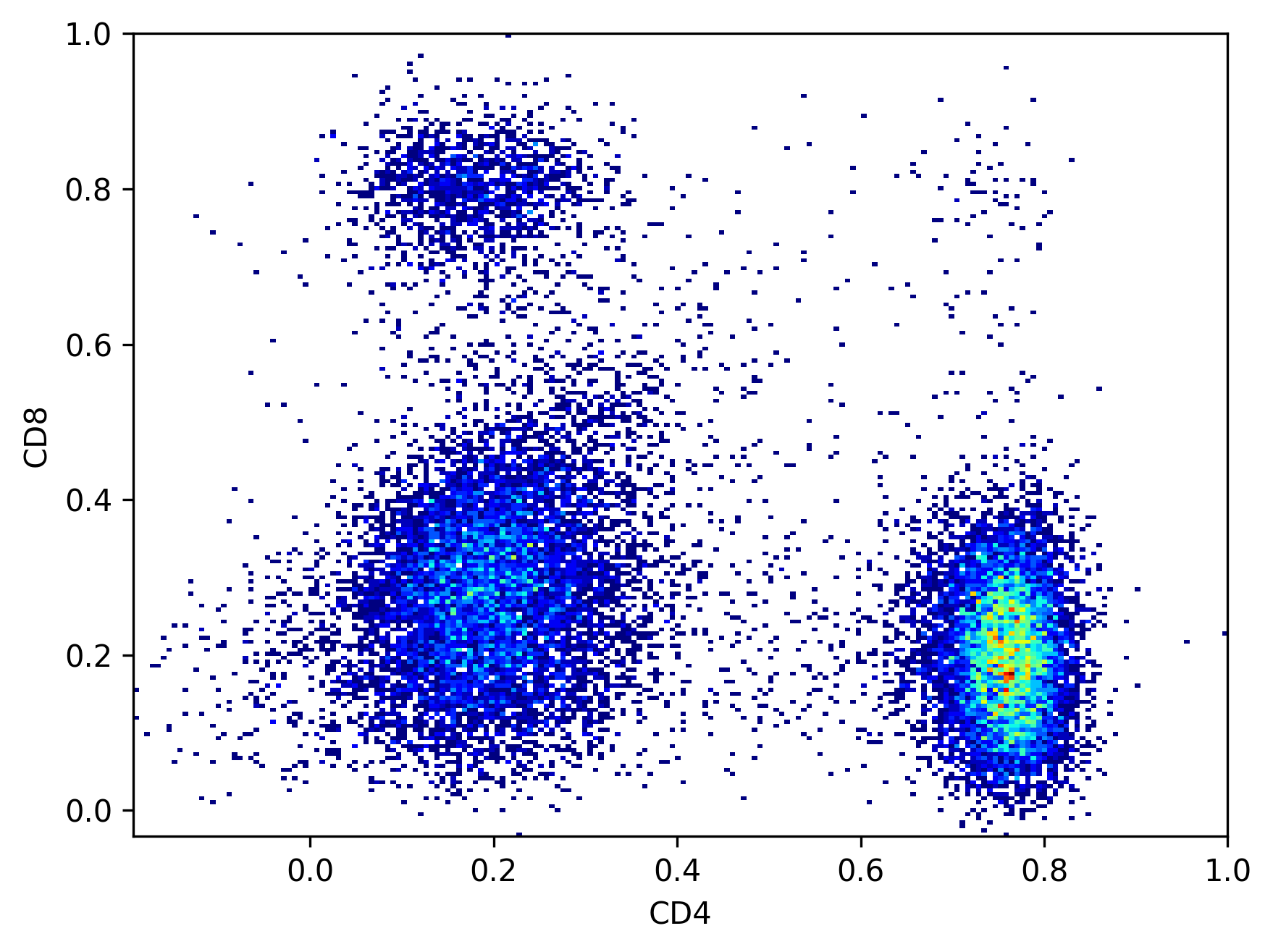
We start with compensating the data and then we transform the data with the logicle function. For CyTOF data an arcsinh transformation is preferred which is also found in the pytometry package. Besides compensation and transformation, we also recommend cleaning the data by removing margin events and by using cleaning algorithms.
# Compensate
ff_comp = pm.pp.compensate(ff, inplace=False)

cols_to_use = [8, 11, 13, 14, 15, 16, 17]
colnames_to_use = ff_comp[:, cols_to_use].var_names.tolist()
colnames_to_use
['CD8', 'TCRyd', 'TCRb', 'NK1/1', 'CD4', 'CD19', 'CD3']
# Transform
ff_t = pm.tl.normalize_autologicle(ff_comp, channels=colnames_to_use, inplace=False)
# Visualize data
ax = plt.hist2d(ff_t[:, "CD4"].X.flatten(), ff_t[:, "CD8"].X.flatten(), bins=200, cmin=1, cmap="jet")
plt.xlabel("CD4")
plt.ylabel("CD8")
plt.show()
FlowSOM#
The easiest way to use this package is using the wrapper function FlowSOM, although it has less options than using the underlying functions separately. It holds the data in a MuData object, of which the first modality is the cell data and the second modality is the cluster data. We will cluster the data with a 10 x 10 SOM grid and 10 metaclusters. Notice that due to the just-in-time compilation of numba, the first run of FlowSOM can take a while and the subsequent runs will be much faster. We also set the seed here to make sure the analysis is deterministic and reproducible.
fsom = fs.FlowSOM(ff_t.copy(), cols_to_use=cols_to_use, n_clusters=10, xdim=10, ydim=10, seed=42)
We can inspect the underlying model and can see it’s like any other scikit-learn model. The FlowSOM estimator first overclusters using a cluster_model (Self-Organizing Map). Then it uses a metacluster_model (Consensus Agglomerative Clustering) to merge the clusters into metaclusters.
fsom.model
FlowSOMEstimator(cluster_model=SOMEstimator(codes=array([[ 0.19228934,  0.1865745 ,  0.23266686,  0.87238413,  0.05209107,
         0.3103338 ,  0.21093693],
       [ 0.37591392,  0.26387554,  0.21212712,  0.5848203 ,  0.21481907,
         0.26141116,  0.21131037],
       [ 0.428116  ,  0.27063912,  0.32987905,  0.46879607,  0.3014614 ,
         0.24979484,  0.21359852],
       [ 0.71539164,  0.25424176,  0.22920464,  0.38272676,  0.49828213,
         0.2463...
       [ 0.16985969,  0.12226646,  0.56166893,  0.25476876,  0.7380235 ,
         0.40652   ,  0.7086935 ],
       [ 0.27684072,  0.16656815,  0.6013744 ,  0.11409374,  0.7604119 ,
         0.36639097,  0.735394  ],
       [ 0.1659379 ,  0.27120367,  0.5247936 ,  0.12309174,  0.7345894 ,
         0.2421986 ,  0.67283285],
       [ 0.2248714 ,  0.31179267,  0.61458   ,  0.05833715,  0.773493  ,
         0.13654871,  0.74112475]], dtype=float32),
                                            seed=42),
                 metacluster_model=ConsensusCluster(K=10, n_clusters=10))
In a Jupyter environment, please rerun this cell to show the HTML representation or trust the notebook. On GitHub, the HTML representation is unable to render, please try loading this page with nbviewer.org.
FlowSOMEstimator(cluster_model=SOMEstimator(codes=array([[ 0.19228934,  0.1865745 ,  0.23266686,  0.87238413,  0.05209107,
         0.3103338 ,  0.21093693],
       [ 0.37591392,  0.26387554,  0.21212712,  0.5848203 ,  0.21481907,
         0.26141116,  0.21131037],
       [ 0.428116  ,  0.27063912,  0.32987905,  0.46879607,  0.3014614 ,
         0.24979484,  0.21359852],
       [ 0.71539164,  0.25424176,  0.22920464,  0.38272676,  0.49828213,
         0.2463...
       [ 0.16985969,  0.12226646,  0.56166893,  0.25476876,  0.7380235 ,
         0.40652   ,  0.7086935 ],
       [ 0.27684072,  0.16656815,  0.6013744 ,  0.11409374,  0.7604119 ,
         0.36639097,  0.735394  ],
       [ 0.1659379 ,  0.27120367,  0.5247936 ,  0.12309174,  0.7345894 ,
         0.2421986 ,  0.67283285],
       [ 0.2248714 ,  0.31179267,  0.61458   ,  0.05833715,  0.773493  ,
         0.13654871,  0.74112475]], dtype=float32),
                                            seed=42),
metacluster_model=ConsensusCluster(K=10, n_clusters=10))SOMEstimator(codes=array([[ 0.19228934, 0.1865745 , 0.23266686, 0.87238413, 0.05209107,
0.3103338 , 0.21093693],
[ 0.37591392, 0.26387554, 0.21212712, 0.5848203 , 0.21481907,
0.26141116, 0.21131037],
[ 0.428116 , 0.27063912, 0.32987905, 0.46879607, 0.3014614 ,
0.24979484, 0.21359852],
[ 0.71539164, 0.25424176, 0.22920464, 0.38272676, 0.49828213,
0.24634407, 0.25632095],
[ 0.73583204, 0....
[ 0.09626883, 0.0954835 , 0.6673345 , 0.45667934, 0.77735704,
0.4197856 , 0.79728246],
[ 0.16985969, 0.12226646, 0.56166893, 0.25476876, 0.7380235 ,
0.40652 , 0.7086935 ],
[ 0.27684072, 0.16656815, 0.6013744 , 0.11409374, 0.7604119 ,
0.36639097, 0.735394 ],
[ 0.1659379 , 0.27120367, 0.5247936 , 0.12309174, 0.7345894 ,
0.2421986 , 0.67283285],
[ 0.2248714 , 0.31179267, 0.61458 , 0.05833715, 0.773493 ,
0.13654871, 0.74112475]], dtype=float32),
seed=42)SOMEstimator(codes=array([[ 0.19228934, 0.1865745 , 0.23266686, 0.87238413, 0.05209107,
0.3103338 , 0.21093693],
[ 0.37591392, 0.26387554, 0.21212712, 0.5848203 , 0.21481907,
0.26141116, 0.21131037],
[ 0.428116 , 0.27063912, 0.32987905, 0.46879607, 0.3014614 ,
0.24979484, 0.21359852],
[ 0.71539164, 0.25424176, 0.22920464, 0.38272676, 0.49828213,
0.24634407, 0.25632095],
[ 0.73583204, 0....
[ 0.09626883, 0.0954835 , 0.6673345 , 0.45667934, 0.77735704,
0.4197856 , 0.79728246],
[ 0.16985969, 0.12226646, 0.56166893, 0.25476876, 0.7380235 ,
0.40652 , 0.7086935 ],
[ 0.27684072, 0.16656815, 0.6013744 , 0.11409374, 0.7604119 ,
0.36639097, 0.735394 ],
[ 0.1659379 , 0.27120367, 0.5247936 , 0.12309174, 0.7345894 ,
0.2421986 , 0.67283285],
[ 0.2248714 , 0.31179267, 0.61458 , 0.05833715, 0.773493 ,
0.13654871, 0.74112475]], dtype=float32),
seed=42)ConsensusCluster(K=10, n_clusters=10)
ConsensusCluster(K=10, n_clusters=10)
The output is stored in a MuData object, containing two AnnData object: cell_data (n_cells x n_features) and cluster_data (n_SOM_nodes x n_features).
fsom.mudata
MuData object with n_obs × n_vars = 0 × 0
  2 modalities
    cell_data:	19225 x 18
      obs:	'clustering', 'distance_to_bmu', 'metaclustering'
      var:	'n', 'channel', 'marker', '$PnB', '$PnE', '$PnG', '$PnR', '$PnV', 'pretty_colnames', 'markers', 'channels', 'cols_used'
      uns:	'meta', 'n_nodes', 'n_metaclusters'
      layers:	'original'
    cluster_data:	100 x 18
      obs:	'percentages', 'metaclustering'
      uns:	'xdim', 'ydim', 'outliers', 'metacluster_MFIs', 'graph'
      obsm:	'cv_values', 'sd_values', 'mad_values', 'codes', 'grid', 'layout'
We can access the cell data and the cluster data with the get_cell_data() and
get_cluster_data() functions.
The cell data is an anndata object that contains the original cell data. As observations, we find the clustering, metaclustering and distance to best matching unit per cell. In var, we find the pretty colnames, i.e. a combination of markers and channels, the markers, the channels and a boolean mask of the columns used for clustering. n_nodes and n_metaclusters in uns contain the number of clusters and metaclusters respectively.
fsom.get_cell_data()
AnnData object with n_obs × n_vars = 19225 × 18
    obs: 'clustering', 'distance_to_bmu', 'metaclustering'
    var: 'n', 'channel', 'marker', '$PnB', '$PnE', '$PnG', '$PnR', '$PnV', 'pretty_colnames', 'markers', 'channels', 'cols_used'
    uns: 'meta', 'n_nodes', 'n_metaclusters'
    layers: 'original'
The cluster data contains the original median values per cluster per marker. In obsm, we find the cv values, sd values, mad values, coordinates of the nodes, coordinates of the the grid and the coordinates of the MST layout. The xdim, ydim, outliers, igraph object and metacluster MFIs can be found in uns.
fsom.get_cluster_data()
AnnData object with n_obs × n_vars = 100 × 18
    obs: 'percentages', 'metaclustering'
    uns: 'xdim', 'ydim', 'outliers', 'metacluster_MFIs', 'graph'
    obsm: 'cv_values', 'sd_values', 'mad_values', 'codes', 'grid', 'layout'
fsom.get_cell_data().var
| n | channel | marker | $PnB | $PnE | $PnG | $PnR | $PnV | pretty_colnames | markers | channels | cols_used | |
|---|---|---|---|---|---|---|---|---|---|---|---|---|
| Time | 1 | Time | 32 | 0,0 | 0.01 | 262144 | Time <Time> | Time | Time | False | ||
| FSC-A | 2 | FSC-A | 32 | 0,0 | 1.0 | 262144 | 280 | FSC-A <FSC-A> | FSC-A | FSC-A | False | |
| FSC-H | 3 | FSC-H | 32 | 0,0 | 1.0 | 262144 | 280 | FSC-H <FSC-H> | FSC-H | FSC-H | False | |
| FSC-W | 4 | FSC-W | 32 | 0,0 | 1.0 | 262144 | 280 | FSC-W <FSC-W> | FSC-W | FSC-W | False | |
| SSC-A | 5 | SSC-A | 32 | 0,0 | 1.0 | 262144 | 280 | SSC-A <SSC-A> | SSC-A | SSC-A | False | |
| SSC-H | 6 | SSC-H | 32 | 0,0 | 1.0 | 262144 | 280 | SSC-H <SSC-H> | SSC-H | SSC-H | False | |
| SSC-W | 7 | SSC-W | 32 | 0,0 | 1.0 | 262144 | 280 | SSC-W <SSC-W> | SSC-W | SSC-W | False | |
| FITC-A | 8 | FITC-A | GFP | 32 | 0,0 | 1.0 | 262144 | 412 | GFP <FITC-A> | GFP | FITC-A | False |
| Pacific Blue-A | 9 | Pacific Blue-A | CD8 | 32 | 0,0 | 1.0 | 262144 | 417 | CD8 <Pacific Blue-A> | CD8 | Pacific Blue-A | True |
| AmCyan-A | 10 | AmCyan-A | l/d | 32 | 0,0 | 1.0 | 262144 | 496 | l/d <AmCyan-A> | l/d | AmCyan-A | False |
| Qdot 605-A | 11 | Qdot 605-A | 32 | 0,0 | 1.0 | 262144 | 588 | Qdot 605-A <Qdot 605-A> | Qdot 605-A | Qdot 605-A | False | |
| APC-A | 12 | APC-A | TCRyd | 32 | 0,0 | 1.0 | 262144 | 597 | TCRyd <APC-A> | TCRyd | APC-A | True |
| Alexa Fluor 700-A | 13 | Alexa Fluor 700-A | CD45 | 32 | 0,0 | 1.0 | 262144 | 492 | CD45 <Alexa Fluor 700-A> | CD45 | Alexa Fluor 700-A | False |
| APC-Cy7-A | 14 | APC-Cy7-A | TCRb | 32 | 0,0 | 1.0 | 262144 | 511 | TCRb <APC-Cy7-A> | TCRb | APC-Cy7-A | True |
| PE-A | 15 | PE-A | NK1/1 | 32 | 0,0 | 1.0 | 262144 | 505 | NK1/1 <PE-A> | NK1/1 | PE-A | True |
| PE-Texas Red-A | 16 | PE-Texas Red-A | CD4 | 32 | 0,0 | 1.0 | 262144 | 560 | CD4 <PE-Texas Red-A> | CD4 | PE-Texas Red-A | True |
| PE-Cy5-A | 17 | PE-Cy5-A | CD19 | 32 | 0,0 | 1.0 | 262144 | 593 | CD19 <PE-Cy5-A> | CD19 | PE-Cy5-A | True |
| PE-Cy7-A | 18 | PE-Cy7-A | CD3 | 32 | 0,0 | 1.0 | 262144 | 588 | CD3 <PE-Cy7-A> | CD3 | PE-Cy7-A | True |
flowsom_clustering#
Alternatively to working with this FlowSOM object, we can simply add the FlowSOM clustering and metaclustering to an existing AnnData object. The convenience function flowsom_clustering is available and is similar to other clustering methods in the scverse. The FlowSOM
clustering and metaclustering can be found in .obs and the parameters used in the
FlowSOM clustering in .uns.FlowSOM.
ff_clustered = fs.flowsom_clustering(ff_t, cols_to_use, xdim=10, ydim=10, n_clusters=10, seed=42)
ff_clustered
AnnData object with n_obs × n_vars = 19225 × 18
    obs: 'FlowSOM_clusters', 'FlowSOM_metaclusters'
    var: 'n', 'channel', 'marker', '$PnB', '$PnE', '$PnG', '$PnR', '$PnV'
    uns: 'meta', 'FlowSOM'
    layers: 'original'
FlowSOM visualizations#
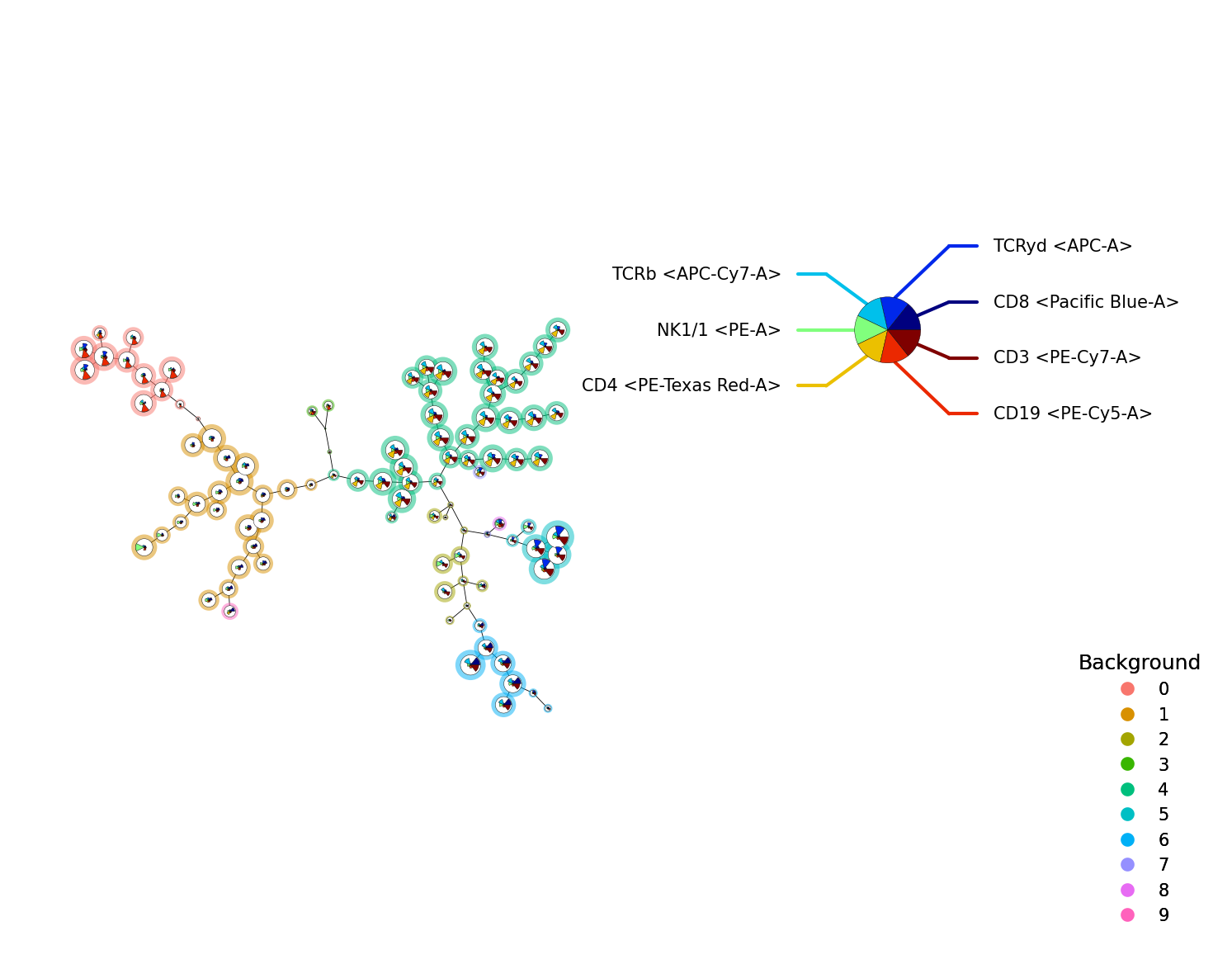
A FlowSOM object can be visualized with the plot_stars() function
p = fs.pl.plot_stars(fsom, background_values=fsom.get_cluster_data().obs.metaclustering)
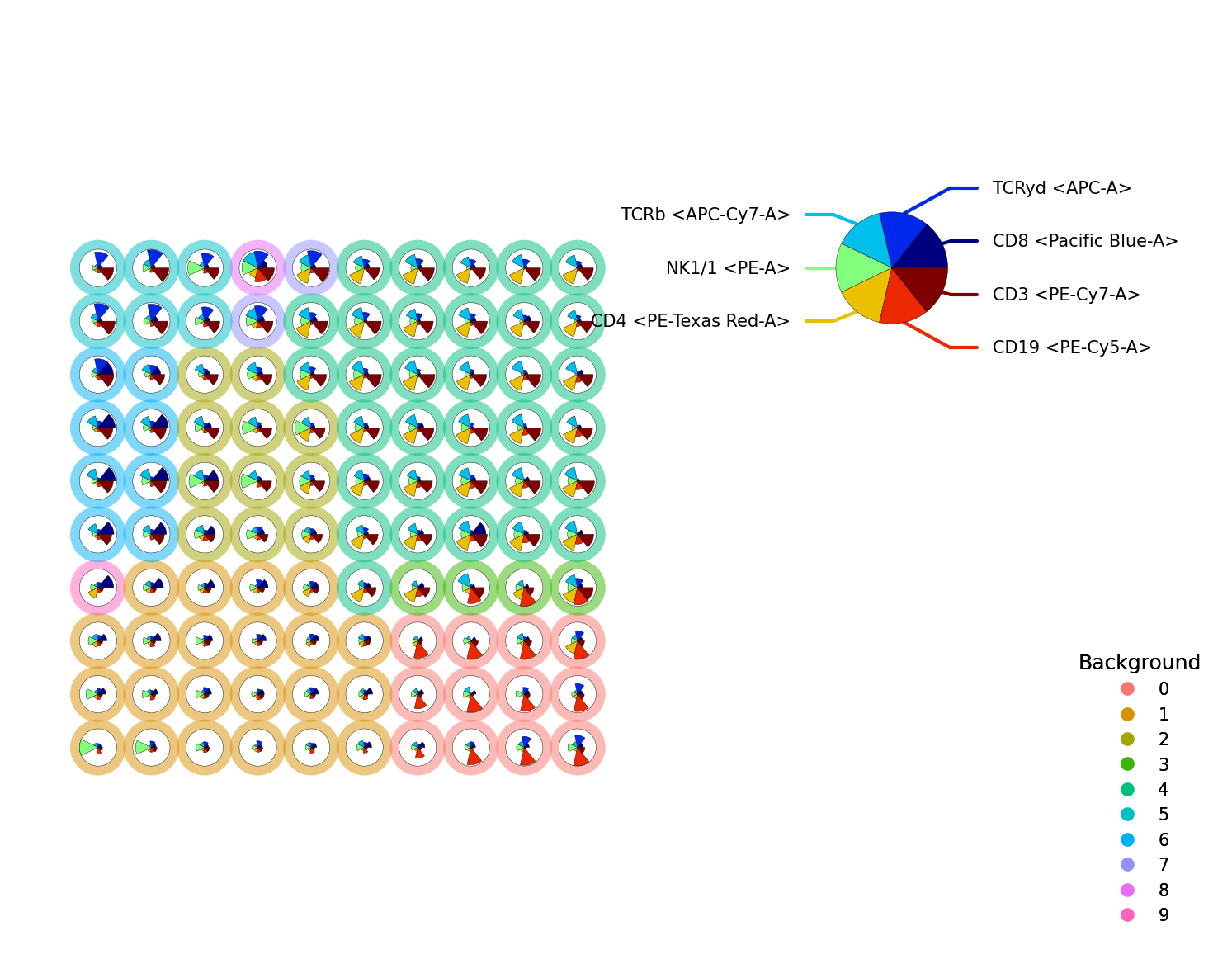
We can also visualize the grid, to reduce overlap and get a better view of the data. The node sizes of the nodes and/or the background nodes can be made equal with the equal_node_size or equal_background_size argument
p = fs.pl.plot_stars(
    fsom,
    background_values=fsom.get_cluster_data().obs.metaclustering,
    view="grid",
    equal_node_size=True,
    equal_background_size=True,
)
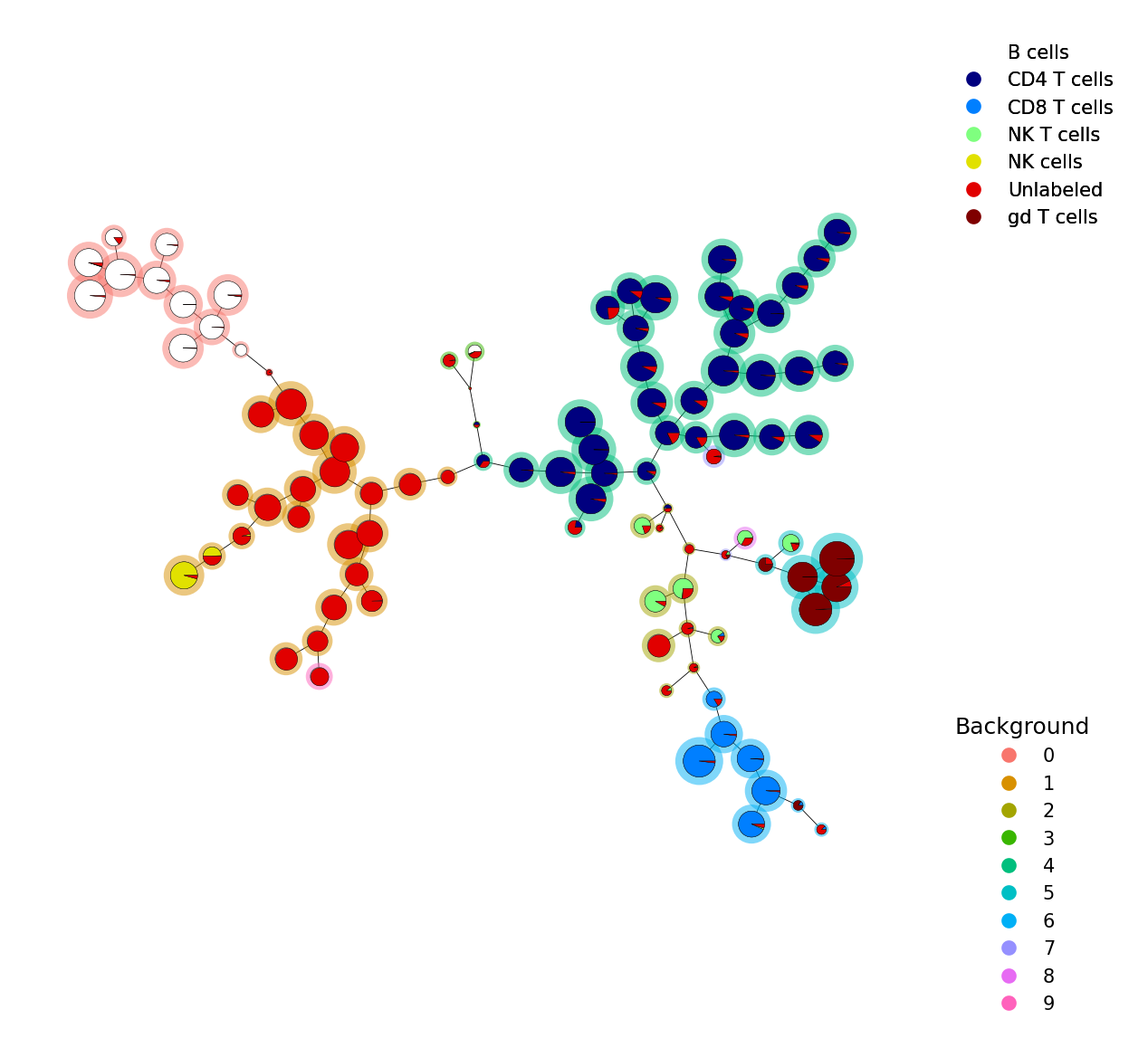
If you have a label for every cell, we can visualize this with plot_pies().
Here every node is a piechart with the percentage of cells in each cluster.
# Read in that data
file = open("../../tests/data/gating_result.csv")
data = csv.reader(file)
data = [i[0] for i in data]

# Plot
p = fs.pl.plot_pies(fsom, data, background_values=fsom.get_cluster_data().obs.metaclustering)
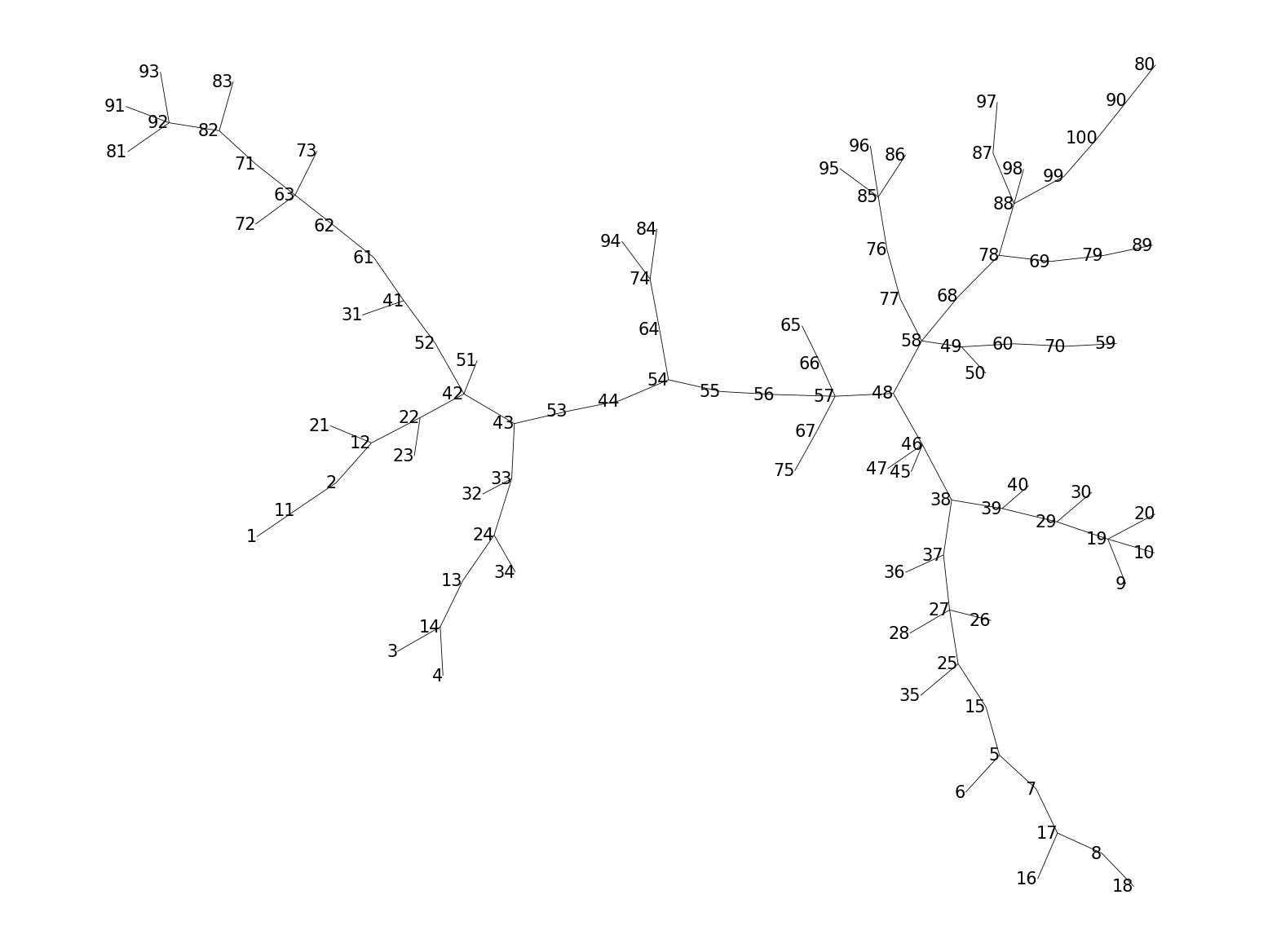
We can also visualize the cluster numbers or metacluster numbers with the help of
plot_numbers(), if level="clusters" or level="metaclusters", respectively.
This functions uses plot_labels() internally, to which one can pass custom labels,
such as the cell type labels.
p = fs.pl.plot_numbers(fsom, level="clusters", text_size=5)
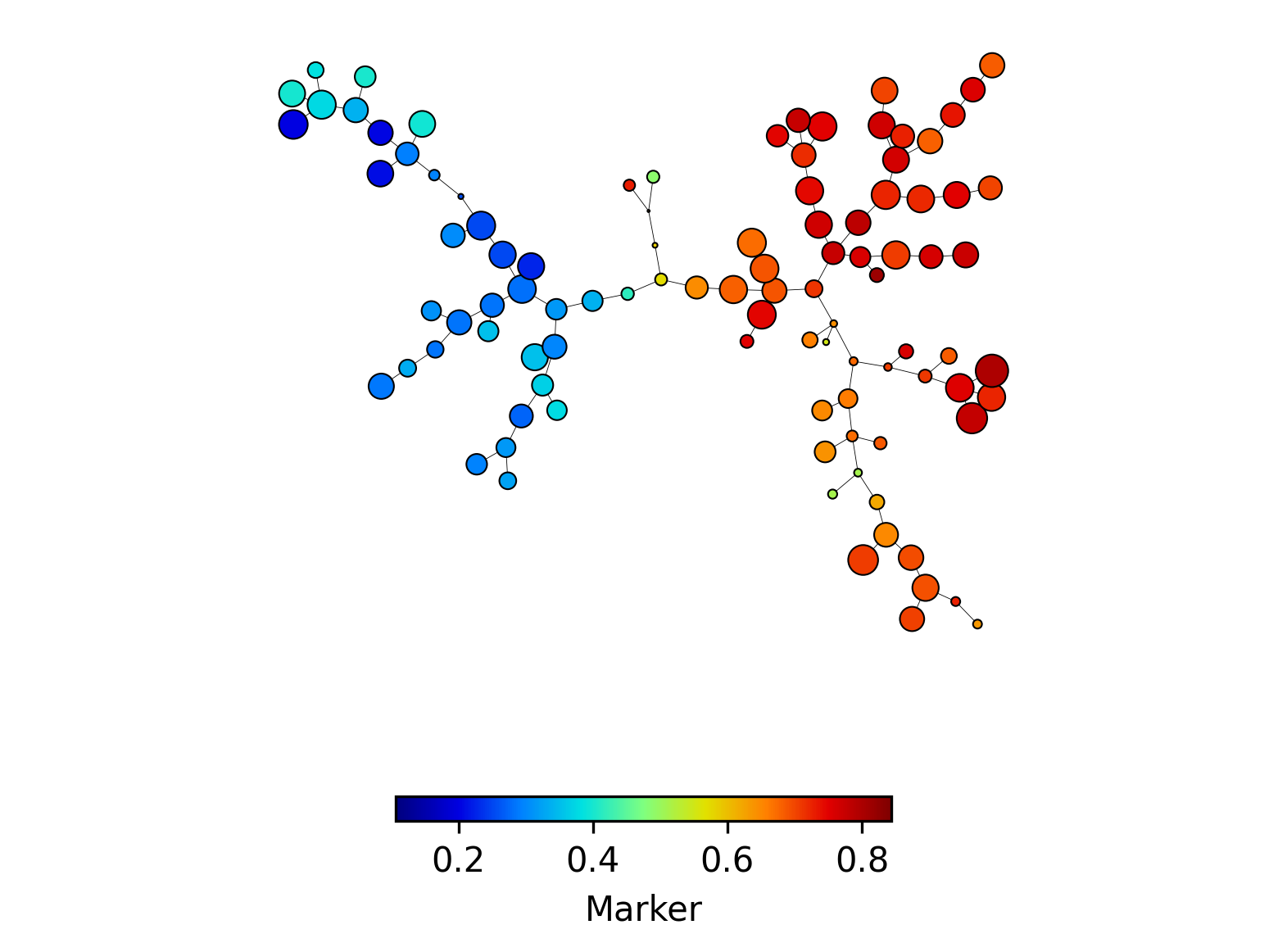
It is possible to visualize one marker on a FlowSOM tree with the plot_marker()
function. This function uses the plot_variable() function internally, to which
one can pass custom variables, such as the cell type labels.
p = fs.pl.plot_marker(fsom, marker=np.array(["CD3"]))
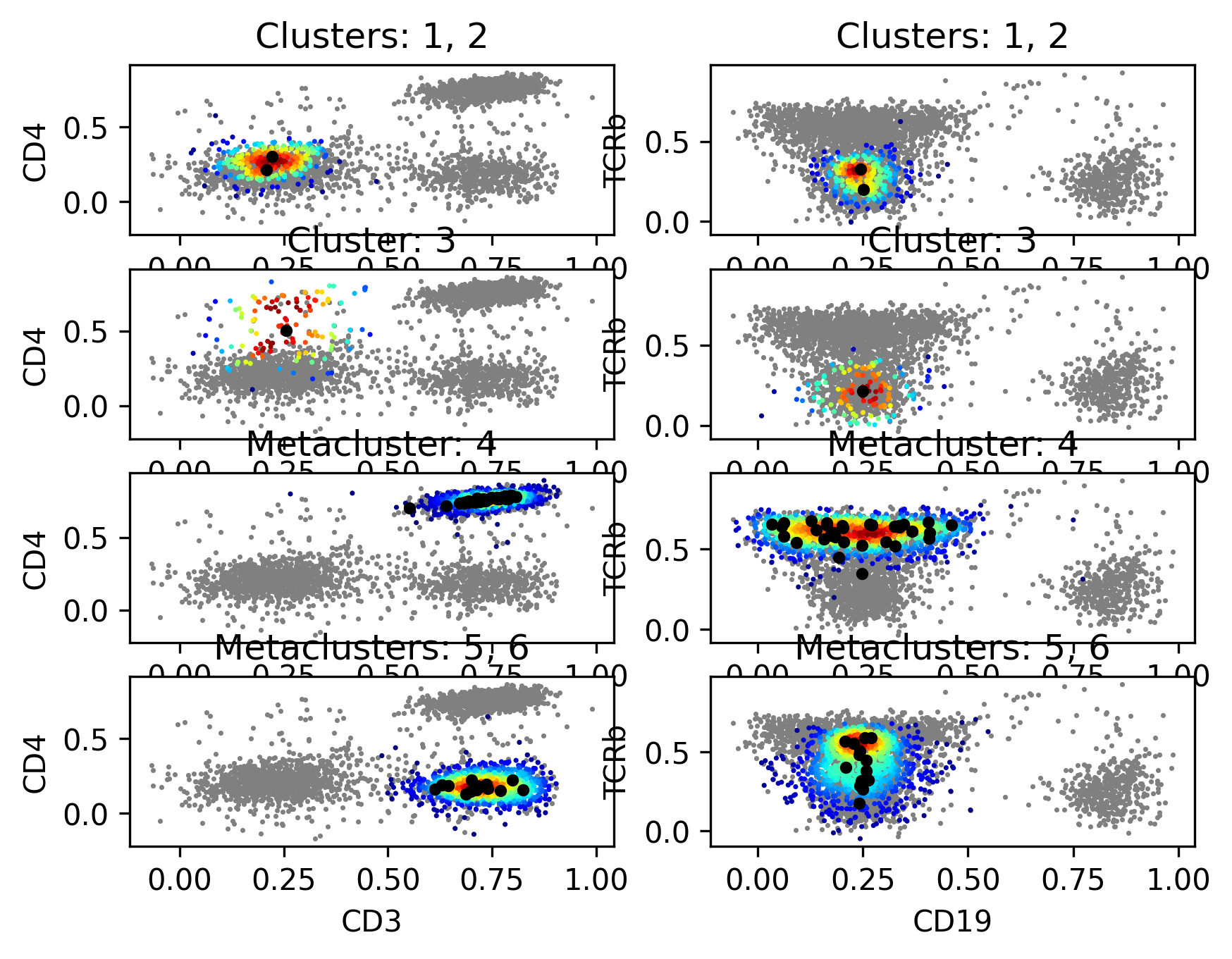
We can also visualize the clusters and metaclusters on a 2D scatter plot with
plot_2D_scatters().
p = fs.pl.plot_2D_scatters(
    fsom,
    channelpairs=[["CD3", "CD4"], ["CD19", "TCRb"]],
    clusters=[[1, 2], [3]],
    metaclusters=[[4], [5, 6]],
    density=True,
    centers=True,
)
Downstream analysis#
We might need the percentages, counts or the percentages
of positive cells per cluster or metacluster and per file for further analysis.
This can be done with the get_features() function. This function returns a
dictionary containing pandas of the requested data.
features = fs.tl.get_features(
    fsom,
    files=[ff_t[1:1000, :], ff_t[1000:2000, :]],
    level=["clusters", "metaclusters"],
    type=["counts", "percentages"],
)
features["metacluster_percentages"]
| MC0 | MC1 | MC2 | MC3 | MC4 | MC5 | MC6 | MC7 | MC8 | MC9 | |
|---|---|---|---|---|---|---|---|---|---|---|
| 0 | 0.134134 | 0.253253 | 0.038038 | 0.007007 | 0.38038 | 0.088088 | 0.087087 | 0.009009 | 0.002002 | 0.001001 |
| 1 | 0.133000 | 0.227000 | 0.038000 | 0.003000 | 0.40100 | 0.090000 | 0.099000 | 0.001000 | 0.004000 | 0.004000 |
The counts, percentages, percentages_positive, per cluster or metacluser can also
extracted from a FlowSOM object. For this we can use get_counts(), get_percentages(),
get_cluster_percentages_positive() or get_metacluster_percentages_positive, respectively.
fs.tl.get_counts(fsom, level="clusters")
| counts | |
|---|---|
| C0 | 258 |
| C1 | 110 |
| C2 | 171 |
| C3 | 114 |
| C4 | 230 |
| ... | ... |
| C95 | 222 |
| C96 | 271 |
| C97 | 219 |
| C98 | 245 |
| C99 | 231 |
100 rows × 1 columns
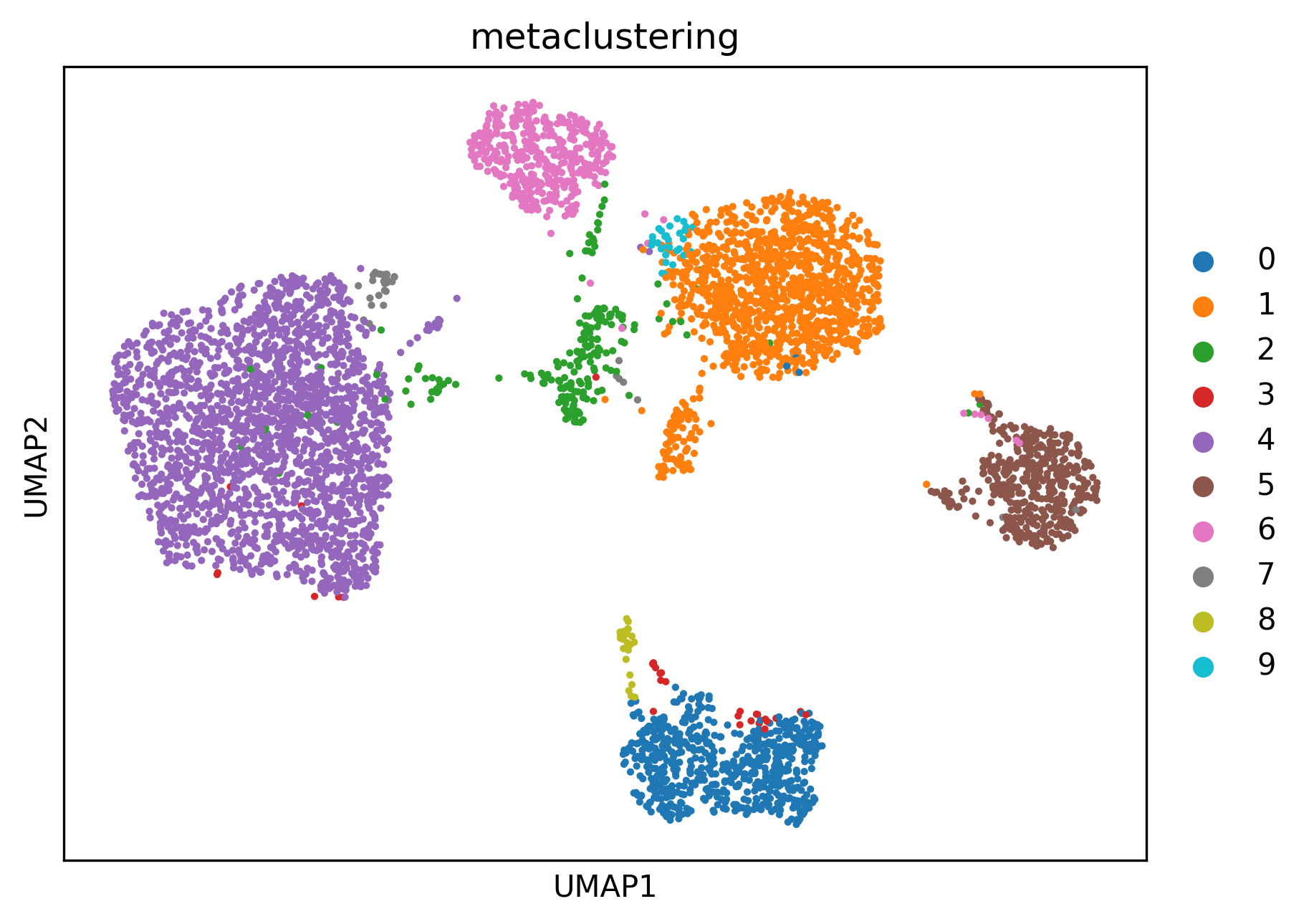
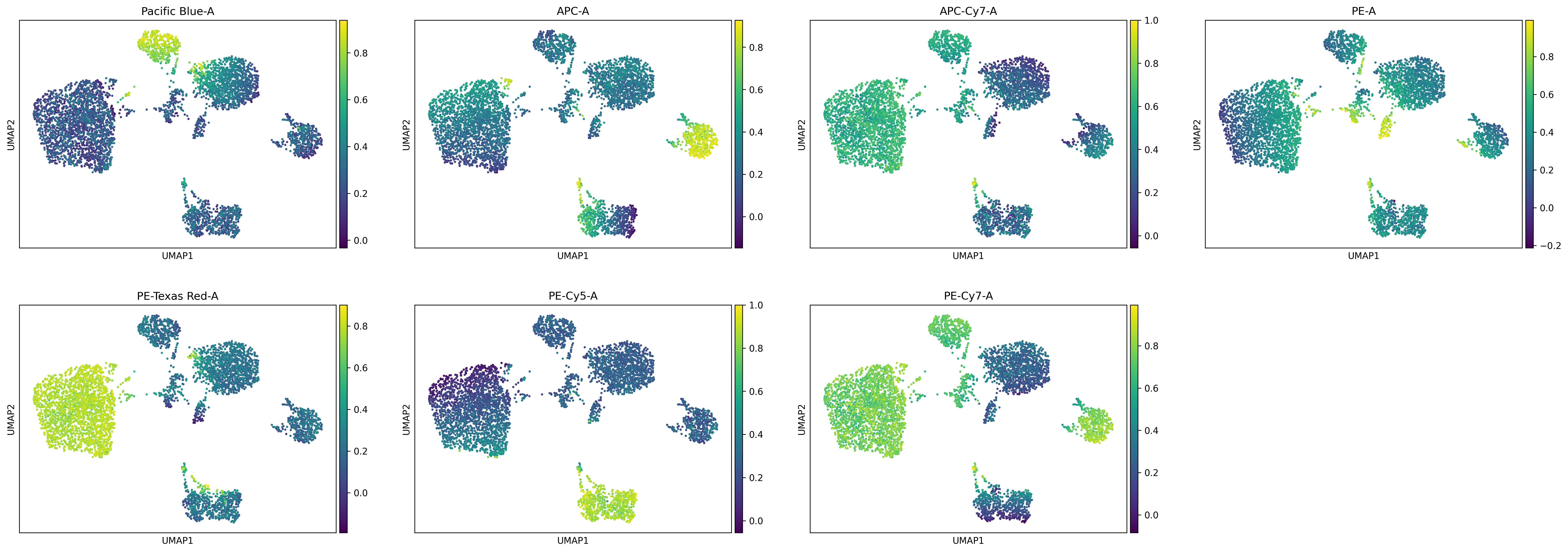
At last it is also possible to visualize a UMAP colored by the metaclustering or the expression of a marker. For this we will use scanpy.
# Get subset of the cell data
ref_markers_bool = fsom.get_cell_data().var["cols_used"]
subset_fsom = fsom.get_cell_data()[
    np.random.choice(range(fsom.get_cell_data().shape[0]), 5000, replace=False),
    fsom.get_cell_data().var_names[ref_markers_bool],
]
sc.pp.neighbors(subset_fsom)
sc.tl.umap(subset_fsom)
# By metaclustering
subset_fsom.obs["metaclustering"] = subset_fsom.obs["metaclustering"].astype(str)
sc.pl.umap(subset_fsom, color="metaclustering")
# By markers
sc.pl.umap(subset_fsom, color=fsom.get_cell_data().var_names[ref_markers_bool])
Other interesting functions#
To get the markers or channels from the corresponding channels or markers of an FCS or a FlowSOM object, we can use get_markers() or get_channels().
newdata subset
fs.tl.get_channels(ff_t, np.array(["CD3", "CD4"]))
{'PE-Cy7-A': 'CD3', 'PE-Texas Red-A': 'CD4'}
fs.tl.get_markers(fsom, np.array(["PE-A", "PE-Cy7-A"]))
{'NK1/1': 'PE-A', 'CD3': 'PE-Cy7-A'}
We can also merge multiple FCS files with random subsampling
with the function aggregate_flowframes().
fs.pp.aggregate_flowframes(
    filenames=[
        "../../tests/data/not_preprocessed.fcs",
        "../../tests/data/not_preprocessed.fcs",
    ],
    c_total=5000,
)
AnnData object with n_obs × n_vars = 5000 × 18
    obs: 'Original_ID', 'File', 'File_scattered'
    uns: 'meta'
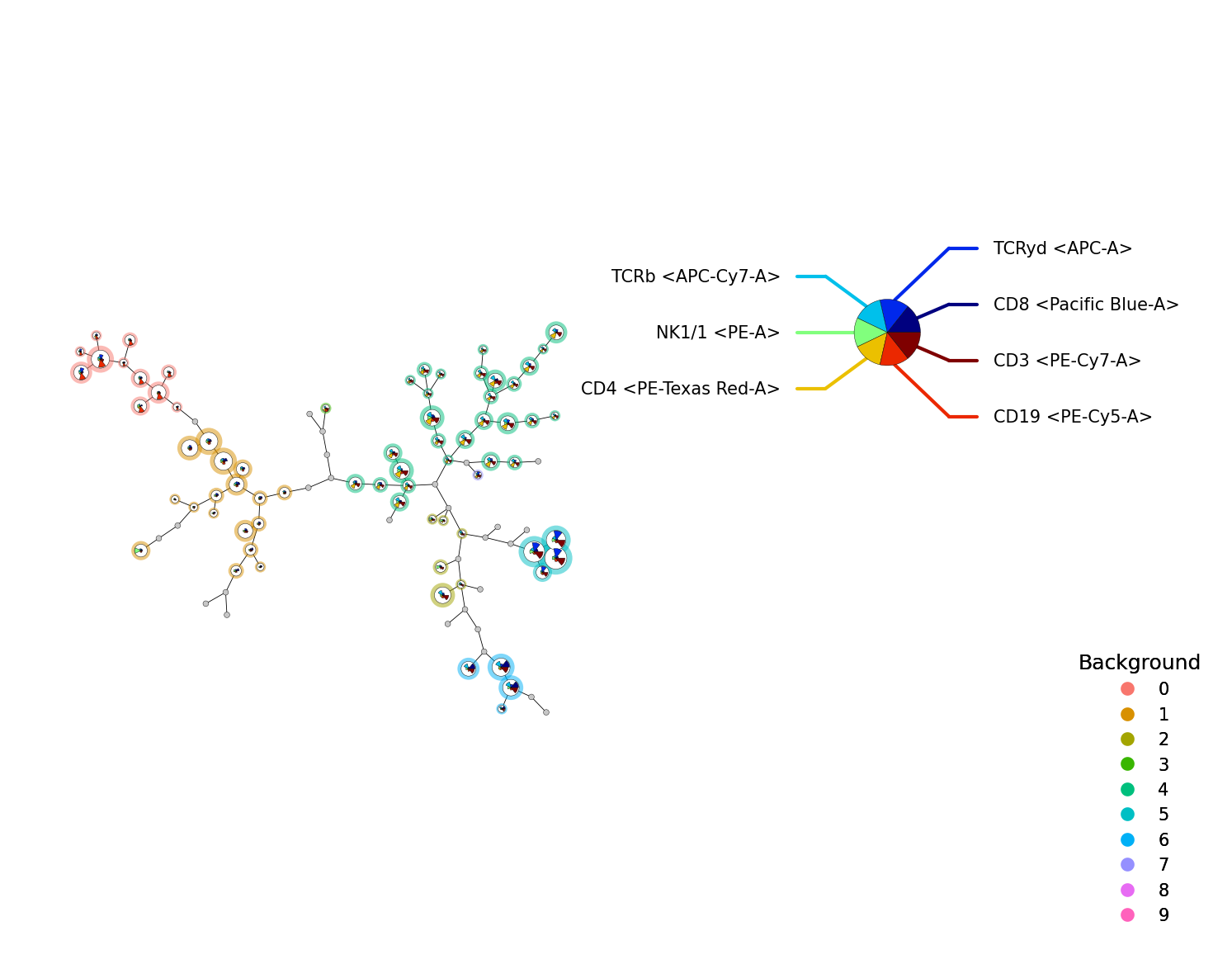
To map new data on an existing FlowSOM object, we can use the new_data() function.
fsom_new = fsom.new_data(ff_t[1:200, :])
p = fs.pl.plot_stars(fsom_new, background_values=fsom_new.get_cluster_data().obs.metaclustering)
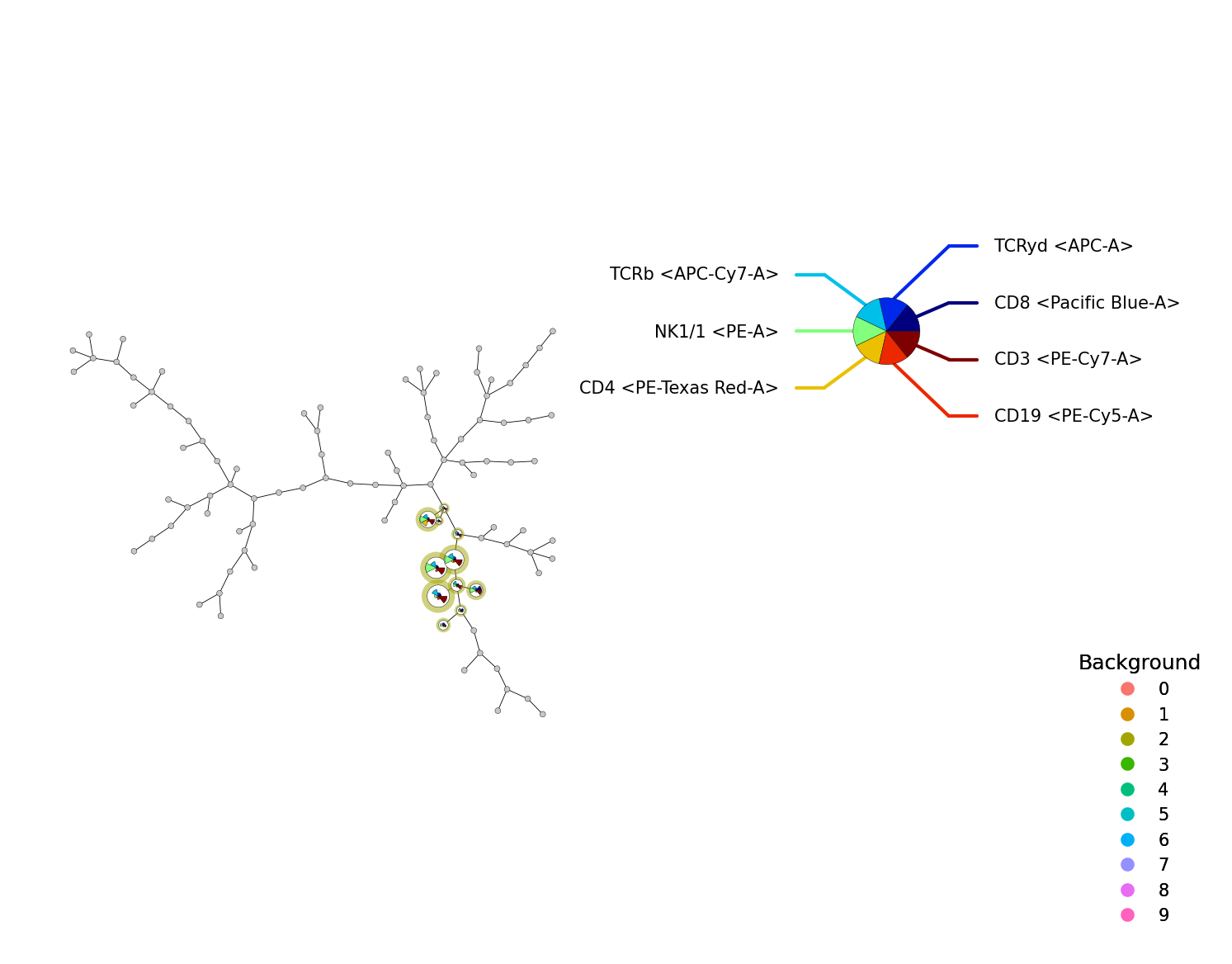
We can also take a subset of a FlowSOM object. For this we use the subset() function.
fsom_subset = fsom.subset(fsom.get_cell_data().obs["metaclustering"] == 2)
p = fs.pl.plot_stars(fsom_subset, background_values=fsom_subset.get_cluster_data().obs.metaclustering)
import session_info2

session_info2.session_info(dependencies=True)